Sunday, April 29, 2012

Never knew Downloader.Agent2.BBLD was so simple

I had just started writing a new C++ console app (under Visual Studio 2010  10.0.40219.1 SP1Rel) to test something out, and had just this:

#include <stdio.h>
#include <Windows.h>

int main(int argc, char** argv)
{
  return 0;
}

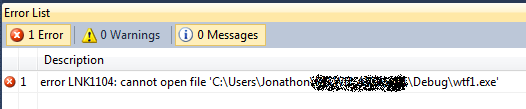
I unintentionally clicked Start Debugging, and much to my surprise,


Really? How did I screw up something so simple? Several seconds later AVG popped up this "Resident Shield Alert":

Downloader.Agent2.BBLD

Are you kidding me?  So I added a printf...

int main(int argc, char** argv)
{
    printf("WTF is going on\n");
  return 0;
}


Again, threat detected! This time Downloader.Agent2.BAZE.  I disabled AVG, built it again (successfully!) and threw the EXE into IDA, worried that I had some impressive virus injecting a trojan into EXEs I build.  Nothing out of the ordinary found, just the typical complicated CRT startup code, and my simple main().

I uploaded it to VirusTotal to see if this was just AVG being retarded or what. It had a detection ratio of 8 / 42. Check out that link to see each AV and what they detected it as.  It is important to note that AVG picked up the file before it had even finished building (hence the link error) with Resident Shield, but also the finished EXE with a manual scan.

"This is absurd!" I'm thinking. One more try....


int main(int argc, char** argv)
{
    printf("WTF is going on\n");
    getchar();
    printf("This is ridiculous\n");
    return 0;
}


Finally, this one built okay and AVG let it alone.  Curious, I uploaded this one to VirusTotal too. It was picked up by only 1 / 42 AVs:   McAfee-GW-Edition identified it as Heuristic.BehavesLike.Win32.Suspicious.H. Sounds more like Heuristic.WeHaveNoIdea.FlagEverything.H

Thursday, October 27, 2011

SSDs and Windows 'Users' Directory

After getting my new SSD installed, I really wanted to get everything setup so that my data was safe on the 1 TB RAID 1 array.  This meant somehow moving the Users directory from C:\ (the SSD) to D:\ (the RAID).

The two main approaches are:

  1. Use an unattend.xml file during Windows installation to specify the Users directory.
  2. Move the Users directory after installation, and create a junction point at the original location to point to the newly located directory.  Here, the junction essentially acts as a symbolic link (although symlinks are a different thing in NTFS.)
After reading a ton of forum and blog posts, I decided to follow Marilyn O's advice on this question and decided to go with #2, because it is a single point of change, and should be easily reversible.

Here's how I got it working.  C: is my SSD where Windows is installed, and D: is the RAID array to which I'm moving my Users directory. Your drives/paths may be different.
  1. Install windows as usual.  Go a head and get the OS in a working state.

  2. Boot to a command line from the install media.  Follow these directions, but on the System Recovery Options dialog, click the last one, Command Prompt.

  3. Use robocopy to make an exact copy of Users to the new location:
    robocopy /mir /xj C:\Users D:\Users
    /mir makes an exact mirror, and /xj ignores junction points. Make sure to include these options!

  4. Verify that all the data has been successfully copied. Then, remove the original Users directory:
    rmdir /s /q C:\Users
    You really have to do this. See comment at the end for why.

  5. There is a junction named "Documents and Settings" (remember him from XP?) that currently points to C:\Users for compatibility purposes. We need to first remove him:
    rd "Documents and Settings"

  6. Now, make the new junctions pointing to the new Users folder on D: using mklink:
    mklink /j C:\Users D:\Users
    mklink /j "C:\Documents and Settings" D:\Users

    (Yes, Linux users, those arguments are in the opposite order.)

  7. Reboot and log in to Windows. If you look in C: in windows explorer, you should see that Users now has a shortcut overlay, indicating that it is a junction point:

Go ahead and play with it; files you make in C:\Users will be there in D:\Users.  Now granted, this may be a slight performance hit, because we have moved some important user files (ntuser.dat for example) onto the slower HDD.  In my opinion though, this is worth it, considering all of my user data is safe.  Additionally, I can back up the entire D: drive, and not worry about wasting space backing up Windows too.

Notes:

I originally just renamed C:\Users to old_users but this caused me to have another Users directory in C: when I looked in windows explorer!  And old_users was nowhere to be found.  But, everything looked okay from the command line.  I even copied it, and had the same results. So there must be some trickery going on that causes windows explorer to show it as Users. Deleting the directory made everything hunky-dory.

New PC!

I finally built a new computer.  My previous one was a Pentium D machine I built my sophomore year of college, in 2007.  I had seen evidence of bad capacitors over a year ago, but hadn't had any problems until recently. Since June, my system's stability had been getting worse as time went on.  More and more frequent blue screens were happening, and I was getting quite tired of it.  I knew that MACHINE_CHECK_EXCEPTION was not a good sign, and almost certainly pointed to a hardware issue.

So I did it.  Tired of my crappy VIA chipset, I made sure to go with an Intel system this time (not that there are really any other options these days, if you have an Intel CPU).

Motherboard Asus P8P67 LE   (Part of this Bundle)
CPU Intel Core i5-2500K
RAM 8 GB (2 x 4GB) Corsair DDR3 1600MHz
GPU XFX Radeon HD 5570 - 1GB DDR3
PSU Thermaltake TRX-650M 650-Watt Modular
Case Cooler Master Elite 310

You'll notice there are no hard drives on that list. I (somewhat recently) put two 1TB Hatachi HDs in RAID 1 so I decided to move those drives to the new box as well.

Overall, I am quite happy with the build. The case obviously isn't worth a million bucks, but it is sturdy and does the job.  The power supply is very nice for the price; I love the modular cords (I hate a messy case!) and it runs quiet and cool.  The one thing I'm not particularly thrilled about is that there are no mounting holes on the right side of the motherboard, so you have about 3" of overhanging PCB, right on the edge where the big connections (24 pin ATX!) are made.

This ASUS board has plenty of bells and whistles that you can read all about. Fancy graphical EFI BIOS, and EPU/TPU chips which are supposed to dynamically auto-tune the system for performance/energy.  I have TPU switched off right now, and will play with overclocking a little bit later (especially since my RAM is 1600MHz and the board defaults to 1333.)

After getting the system built, I got to thinking about SSDs. A quick look at the numbers was enough to sell me right away. Modern SSDs are pushing over 400MB/s and some claim read speeds of up to 500MB/s. At 3.9Gbps, I'm glad my board has several 6Gbps SATA ports!

So I went with the 128GB Crucial m4. It showed up today and I could not wait to get windows installed on it.  Let me just say WOW.  If you are for one second considering making the switch to an SSD, go for it.  I have yet to run any benchmarks on it vs my RAID array, but it is blazing fast.  Windows boots up noticeably much quicker, and everything is just very snappy.  (And yes this is compared to a HDD install on this board/CPU I did before the SSD arrived).

Wednesday, September 21, 2011

A real Python parse integer function

Is anyone else annoyed by the fact that int() in python is retarded and can't tell the difference between decimal, hex, and octal?

Your solution:

def parseint(val):
    if isinstance(val, int):
        return val
    if not isinstance(val, (unicode,str)):
        return None


    try:
        if val.startswith('0x'):
            return int(val, 16)
        if val.startswith('0'):
            return int(val, 8)
        return int(val)
    except ValueError:
        return None

Hope this helps someone.

Monday, August 29, 2011

phpRandDotOrg client updated to 1.0.3

Just a quick note, that my random.org PHP client library has been updated to version 1.0.3, thanks to bugfixes reported to me recently.

Monday, August 22, 2011

Time-Warner RoadRunner speeds

Overall, I'm pleased with the internet service I get from RoadRunner.  My connection can definitely top out well over the 15Mbps it's rated at:


I could stand a little faster than 1.0Mbps upload, but that's pretty typical, as normal residential connections see very asynchronous traffic (download usage much higher than upload).

However, today I came home to find that my router had no WAN IP, and I was unable to view the modem status page at 192.168.100.1 (give that a click if you have a Scientific Atlanta cable modem), so I power-cycled the modem.  Now usually, when I access that address, the only page I can view is the Status page.  All other ones are locked, and say "this feature is not enabled" - because we as users are "dumb" and don't "want" to see that information.  But - they are available while the modem's connection is not Locked, meaning if the cable is unplugged or the modem is still connecting.

I managed to snag a screenshot right before it locked me out again:

Truly amazing how fast the actual connection is.  And truly saddening to know how much throttling is being done on their end.  C'mon TW - would it really kill you to let me have 2 or 3 of that 30MBps upload?

Update to root on HTC Incredible

So I've been enjoying my rooted Incredible for a little over a week now. After my last post, I decided to install the CyanogenMod 7.0.3 ROM.  First let me say, "wow" at just how simple it was to download the .zip file, transfer it via USB (mass storage) to my flash card, and use ClockworkMod Recovery to install the new ROM (after backing up of course!!)  Take that link with a grain of salt, as UnrEVOed3 installs it by default now.

I had installed ClockworkMod ROM Manager (free) from the Market, but decided I wanted to do this first one from the recovery image.  The ROM Manager uses the recovery image anyway, so it shouldn't really matter how I do the next one.  On to the results!

Holy. Battery. Life.
Battery usage screenshot
Not only is the (built-in) battery usage screen awesome, (and the ability to screenshot), but that is 16 hours with a discharge of a little less than 50 percent! Granted, this was over a work day, so it wasn't seeing a ton of usage, but you can see that the phone was waking up and syncing.  This is possibly twice as good as I was seeing with the stock HTC Sense ROM.

I can't show this in a screenshot, but the overall response of the phone is like night and day compared to Sense (in my opinion).  Screens and menus load almost instantly. Apps load many times faster, and it feels like a real 1GHz device!  Granted, this is a fresh install, so I haven't gotten it bogged down, but it is definitely faster than Sense ever was.

I strongly recommend that if you have an Android phone, that you root it, or give it to someone to do it for you.  You won't be disappointed.