Showing posts with label Windows 7. Show all posts

Saturday, January 3, 2015

Dual Booting with GRUB2 (CentOS 7) and Windows 7

TL;DR:You need to install the ntfs-3g package, in order for os-prober to detect Windows installations. This allows grub2-mkconfig to automatically generate an entry for dual-booting into Windows.


Doing a lot more hardware hacking these days, I've felt constrained running Linux in a VM all the time. I was especially disappointed that VirtualBox doesn't expose nested Intel VT-x features to its guests. So I've decided to try dual-booting again, going with the very stable CentOS 7.

Not willing to sacrifice any space on my Windows SSD, I put another Crucial SSD in my machine - this time the 256 GB version of their newer MX100 series. Downloading the NetInstall ISO and pointing at a relatively close mirror gave a very satisfying install experience. Having the whole drive made things quite easy as well - except for the actual Dual-Booting part.

I wasn't terribly surprised that the setup process didn't automatically add a GRUB 2 entry for booting to my Windows 7 drive. Everything I read indicated that simply running grub2-mkconfig should set up the GRUB config script to include Windows. Yet, it wasn't working for me. Supposedly GRUB 2 uses os-prober to automatically detect other OSes and generate boot entries for them. However, running os-prober showed no Windows install, even though my drive was clearly visible.

After stumbling across this post on LinuxQustions.org, it turns out that the NTFS-3g package (for mounting NTFS volumes) isn't installed by default, and os-prober needs this the mount the drive and detect the installed OS. After installing ntfs-3g (from the EPEL repository), I was able to run grub2-mkconfig -o /boot/grub2/grub.cfg and successfully add an entry for Windows 7.

Tuesday, July 12, 2011

MySQL Service won't start on Windows 7

So today, I attempted to install MySQL on Windows 7.  From the MySQL Download site, I grabbed the latest version of their .msi installer,  mysql-installer-5.5.13.2.msi.  I went through the installer, and found that the last step, starting the MySQL services (mysqld) was failing.  The service existed in services.msc, and in the registry, but it refused to start.  Attempting to start it from the command line ("NET START MySQL") failed, giving the following output:

The MySQL service is starting...
The MySQL service could not be started.

A system error has occurred.

System error 1067 has occurred.

The process terminated unexpectedly.

Very descriptive. Thanks.  I tried checking for a log file from MySQL, but could't find it. Strange.  Well, it turns out, MySQL on windows has its data directory at C:\ProgramData\MySQL\MySQL Server 5.5\data.   You can verify this in your installation by looking at the my.ini file, in your MySQL installation directory (probably C:\Program Files (x86)\MySQL\MySQL Server 5.5\), and finding the line that says datadir=...

I didn't even know ProgramData existed!  It's hidden, so either unhide it (Control Panel -> Folder Options -> Show hidden...) or simply enter c:\ProgramData into your explorer title bar.  In this data directory, there should exist the log file [hostname].err.  Taking a glance at that, I found:

InnoDB: Error: log file .\ib_logfile0 is of different size 0 33554432 bytes
InnoDB: than specified in the .cnf file 0 56623104 bytes!

Thanks to this post on forums.mysql.com, I found that simply deleting ib_logfile0 and ib_logfile1 solved the problem.  Seems like a dumb installer mistake to me!  A bug report already exists, so I'll just keep quiet until the next install :-)  Hope this helps!

Tuesday, June 21, 2011

Windows 7 "Unidentified Network" woes

There are hundreds of posts in forums and in blogs with people complaining about not being able to click the "Public Network" link and change an "Unidentified Network" to the Private profile:


In this case, it was my VirtualBox Host-Only connection, but this could really apply to any private network with static IP addresses and no DHCP server (and usually no Default Gateway - I think this is what makes Windows decide it is "unidentified").

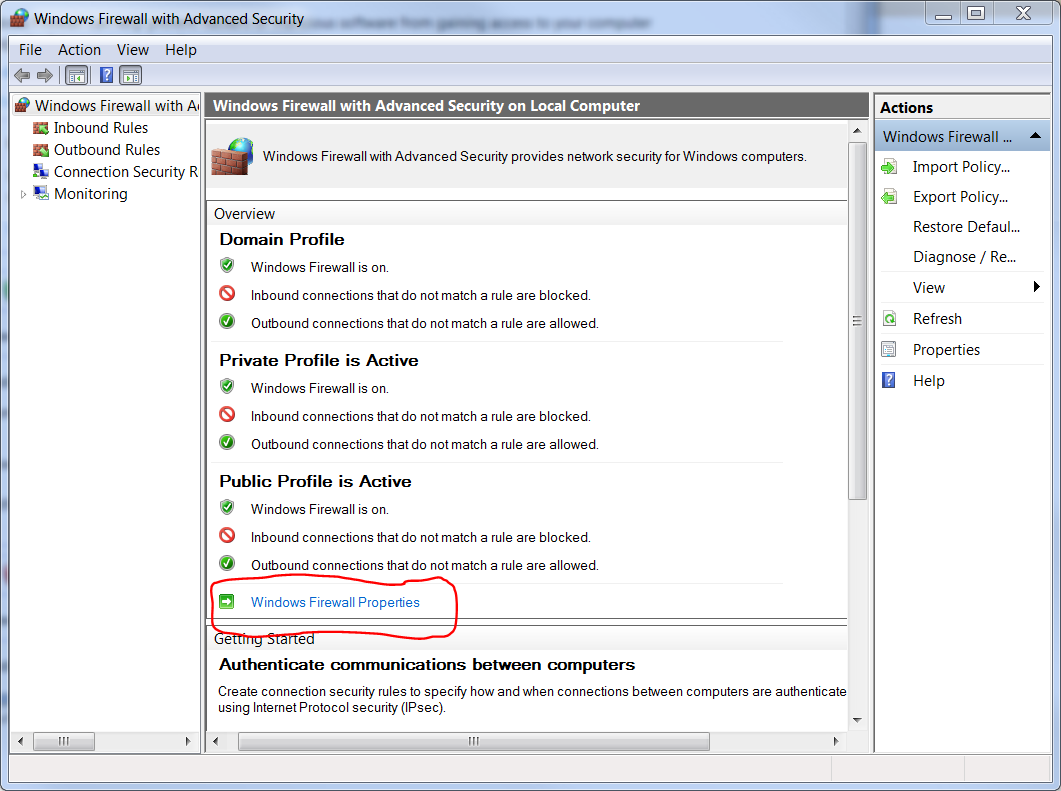
In my situation, I was unable to ping the windows host from my VM, and subsequently couldn't access any Samba shares on my host.  After hours of digging, I gave up on trying to "identify" this network, and instead went after the windows firewall settings.  Since windows insists on making this a public network, I chose to disregard windows firewall, for this interface only:


After this, I was able to ping the windows host, and view its Samba shares.  Hope this helps.